Approvals
An Approval puts a decision in front of the right people before a record advances. You define an Approval Policy for one record, such as requests: when a record matches its conditions at its moment, the policy asks the people of its first step, then the next step, in order. If nobody can be asked, the request goes to your tenant admins so it never stalls.
When you’d use it
- Gate a change or a service request so it cannot proceed without sign-off.
- Ask more than one person in turn, such as the requester’s manager and then Finance.
- Hold an agent’s proposed action behind human review before it executes.
- Treat two requests on the same record differently with a condition on the policy (for example, only when the item is a laptop and the amount is more than 1000).
What you manage
Approval policies live under AI → Sign-off (/admin/approvals); the decisions waiting for you appear in the Service Hub’s own navigation, under Approvals (/service-hub/approvals), where approvers already go. The list links there with its count.
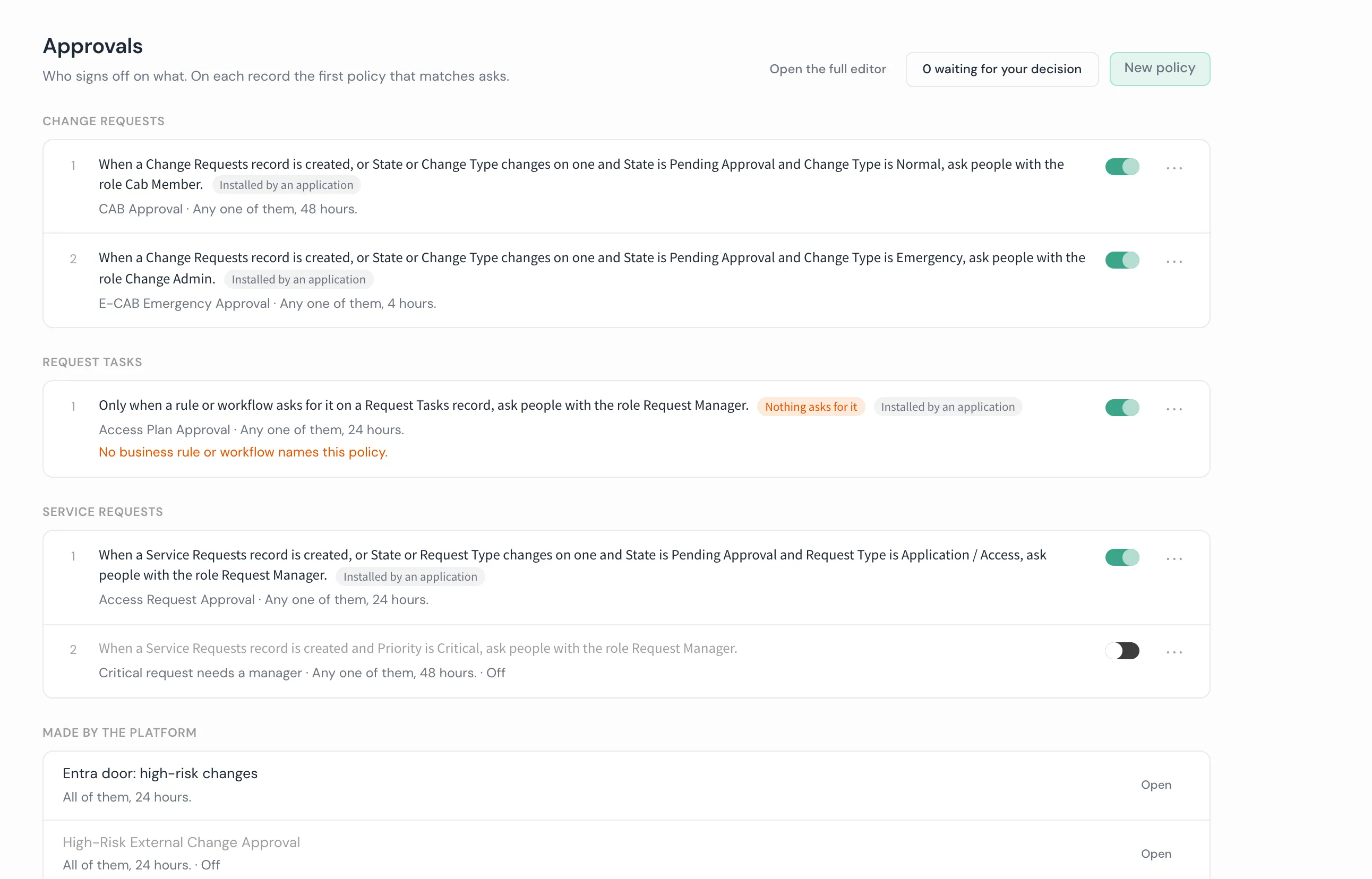
The list groups every policy by the record it asks about, in the order the policies are tried. On each record the first policy that matches is the one that asks, so the order matters: each row’s menu has Move up and Move down. Each row reads as one sentence, for example “When a Request record is created and Item is Request a laptop and Amount is more than 1000, ask the requester’s manager, then people with the role Finance.” Three flags point at a policy that cannot do its job:
- Nobody to ask. A step has no active person to ask. A record that reaches it waits for the admins.
- Never reached. An earlier policy on the same record matches every record this one would. Move this one above it.
- Nothing asks for it. The policy asks only when a rule or workflow names it, and none does.
A policy an application installed is marked “Installed by an application” and reads only. The platform’s own plan policies sit apart under “Made by the platform”. New policy opens an empty policy page; a new policy is saved switched off, so it asks nobody until you switch it on.
Opening a policy goes to the policy page, read top to bottom:
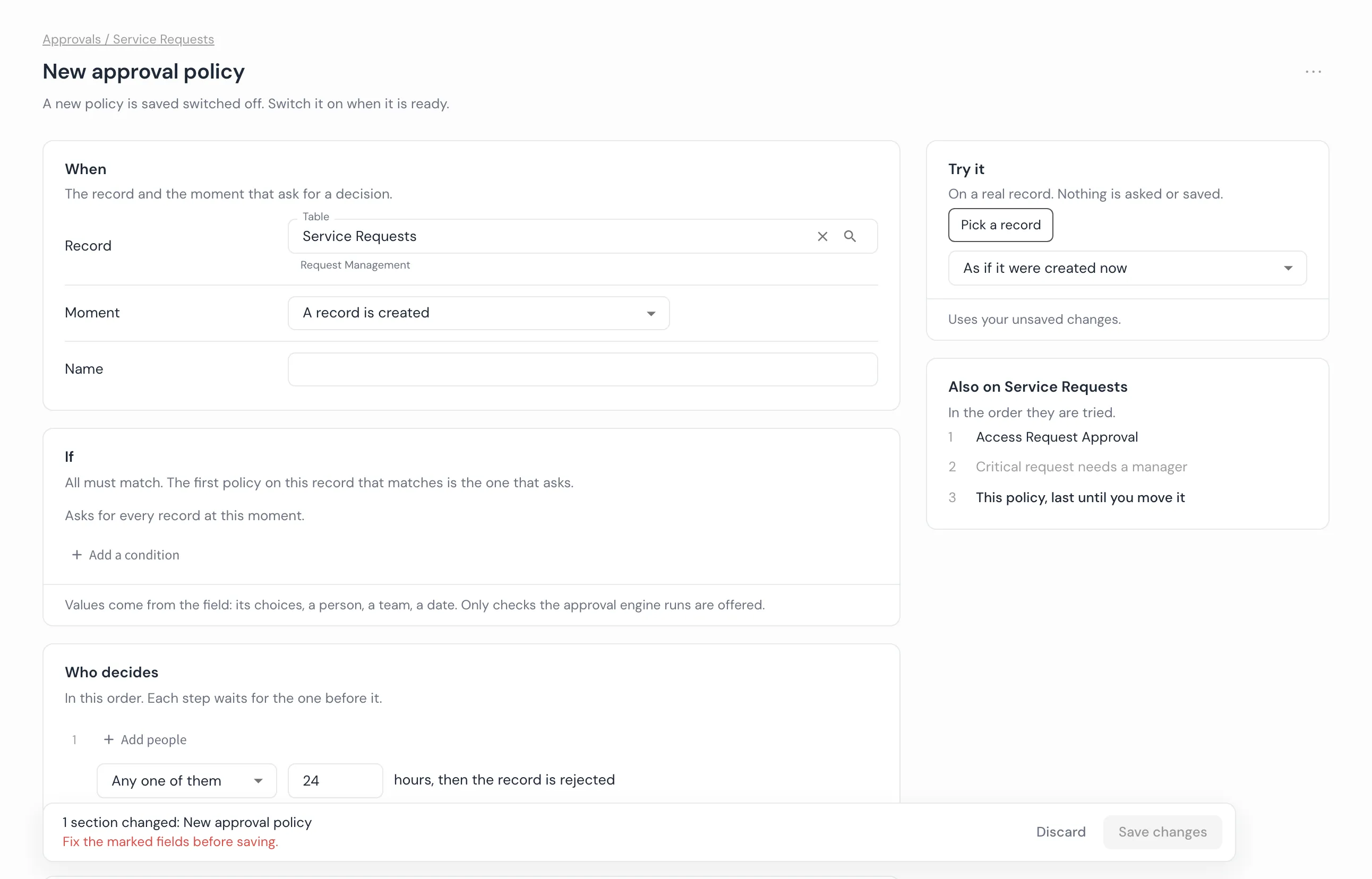
- When. The record, fixed once the policy is first saved, and the moment that asks: a record is created, a record changes (optionally only when named fields change), either, or only when a rule or workflow asks for it.
- If. The checks that must all match. Only the checks the approval engine runs are offered.
- Who decides. The steps, in order. Each step names people: a person, people with a role, a team, the requester’s manager (with a team that decides when there is no manager), the manager of the person in a field, or the person in a field. A single step may wait for any one of them or all of them; with a second step (“Then ask someone else”), every step is any one of them. Each step waits its hours, then the record is rejected.
- Then. The state the record moves to when approved (and any fields it sets) and when rejected, the fields nobody may change while it waits, and whether the requester may withdraw it.
- Advanced, folded, holds the code rules and workflows use to name the policy.
- Try it, beside the page, runs your unsaved policy against one real record, as if it were created now or as if it changed. It shows each check, whether this policy would ask or an earlier one asks first (with a link to it), who each step would ask and who is left out and why, and what the record would do. Nothing is asked or saved.
Changes wait in one save bar until you save. A policy the page cannot hold whole (for example one that names several records, decides by majority, or approves when nobody answers) opens read only with the reason and Open in the full editor, which keeps every setting.
Triggers
A policy’s conditions are only evaluated when one of its trigger flags says to look:
trigger_on_createevaluates the conditions right after a new record is created. Defaults to true when omitted.trigger_on_updateevaluates the conditions after any update to the record. Defaults to false unlesstrigger_on_field_changeis set.trigger_on_field_changenames the fields whose change should evaluate the conditions. Setting it also defaultstrigger_on_updateto true.
If a condition compares a field to a value that is not that field’s default, and neither trigger_on_update nor a trigger_on_field_change naming that field is set, the policy can only ever fire from a create that supplies the value directly. A record saved at its default and only later edited into the condition’s value is never evaluated, so the approval never routes. validate_blueprint reports this shape as a warning (a create can still set the value directly, so it is not refused outright).
Good to know
- One policy asks per record and moment. The first matching policy in the record’s order asks; the others are not tried.
- Any one of them is first-decision-wins. One approval moves the step on, and one rejection ends the approval.
- A policy governs agent Plans only when it names
fl_plans. It never picks up plans by accident from a record policy. - Approver lookups are scoped to your tenant. A crafted id can never resolve an approver in another tenant.
- A stalled request still routes. With no resolvable approver, the decision goes to tenant admins rather than deadlocking.
- A requester is never an approver of their own request. The platform removes them from every resolved approver list, even a role, group or manager they happen to also belong to, and refuses their decision if they somehow end up listed anyway. This is not configurable. For an agent’s plan, the requester is the person who addressed the agent (a direct run, or an
@agentmention); a plan an agent woke on its own has no human requester at all, so nobody is excluded on that account. On a tenant with exactly one admin, that admin may approve their own request for a change that reaches outside the platform; the decision is recorded as a self-approval because they were the only person who could ever decide it. With two or more admins, the usual rule applies and the card explains why. - The approver’s card names the record, not the policy. The title is the source record’s own number and short description (for example “INC-000090: VPN down for the sales team”), and a one-sentence summary names the requester, the record and why the policy asked, never the policy’s own name and never a raw type.
- An approval is visible only to the people it concerns. That is the requester, every past or present approver (including a delegate), whoever made the final decision, anyone holding the oversight capability over approvals, and anyone who can read the source record itself. Holding the general approvals feature is not enough on its own to read someone else’s approval by id; a listing never shows more than this to a person paging through it, however far they page.
- Every way an approval ends closes every pending approver, with who and when. A decision, a timeout, a withdrawal, or switching off the policy that raised it all close out every approver still pending at that moment, not only the one who acted, and stamp who closed it and when. The record’s own lifecycle field (not always a column literally named
state) is written from the table’s own declared lifecycle field, so a table that calls its lifecyclestatusis updated correctly rather than assuming the common name.
How it connects
Approvals own the decision gate and its routing. Telling people about a decision belongs to Notifications, and running the process that follows approval belongs to a Business Rule or Workflow. Approvals also gate intake in Service Hub, where a catalog item’s custom approval opens its policy page, and agent proposals in Plans and governance.
- Configure a policy in the admin guides.
- Exact shapes:
fl_approval_policies(target tables, conditions) andfl_approvals(approval number, unique per tenant); the decision types and every term in the glossary.