Business rules
A Business Rule is automation you attach to a table so the platform reacts for you when a record changes. You choose when it runs (before or after a record is created or updated, or on demand), the conditions to match, and one thing to do when they match: set fields, spawn tasks, start a workflow, dispatch a skill, send a notification, request an approval, or run a script. A rule attached to fl_tasks also runs for every table built on it, so one rule can cover incidents, changes, and requests at once.
When you’d use it
- Auto-fill or normalize a record the moment it is created, such as stamping a category or defaulting a due date.
- Route work by setting the assignment group when a condition matches.
- Kick off a bigger process by starting a workflow or requesting an approval on a state change.
- Keep a policy consistent everywhere by binding one rule to
fl_tasksinstead of repeating it on each table.
What you manage
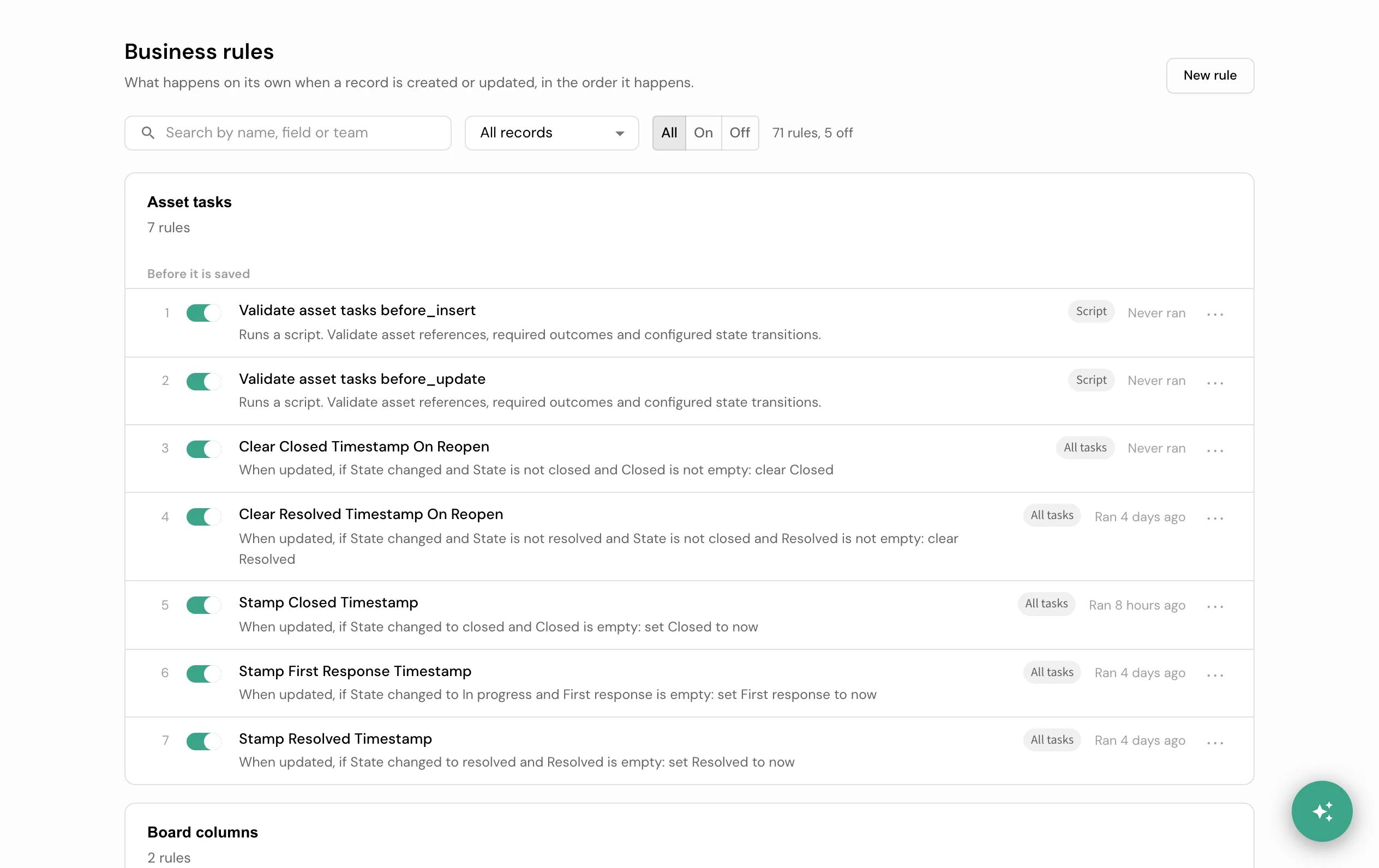
Business rules live under Automate → Business Rules (/tables/business_rules). It opens on the rules list: every rule the tenant has, grouped by the table it is bound to, in the order the engine runs them, before the save and after it. Each row names its record and moment, the condition and the steps in one sentence, whether it is on, a Script / Read only / All tasks tag where it applies, and when it last ran. A rule bound to an ancestor table such as fl_tasks appears inline, marked, exactly where it runs, and again in its own “All tasks” group. Switching a rule on or off saves at once, with an Undo. Delete, in a rule’s menu on the list or on its page, asks first. The rule stops running and moves to the Archive together with its past runs; Restore there brings both back. A rule an application installed stays deleted when that application is updated. Turn a rule off instead when you only want it to pause.
Each row’s menu has Move up and Move down, to reorder a rule among the other rules of its own record and moment. A rule moves one place at a time; the first row of a moment cannot move up and the last cannot move down. A rule bound to an ancestor table cannot be moved from a table that inherits it: move it from its own group instead, where it runs for every kind of task. Moving a rule saves at once, with a status message naming its new place and an Undo.
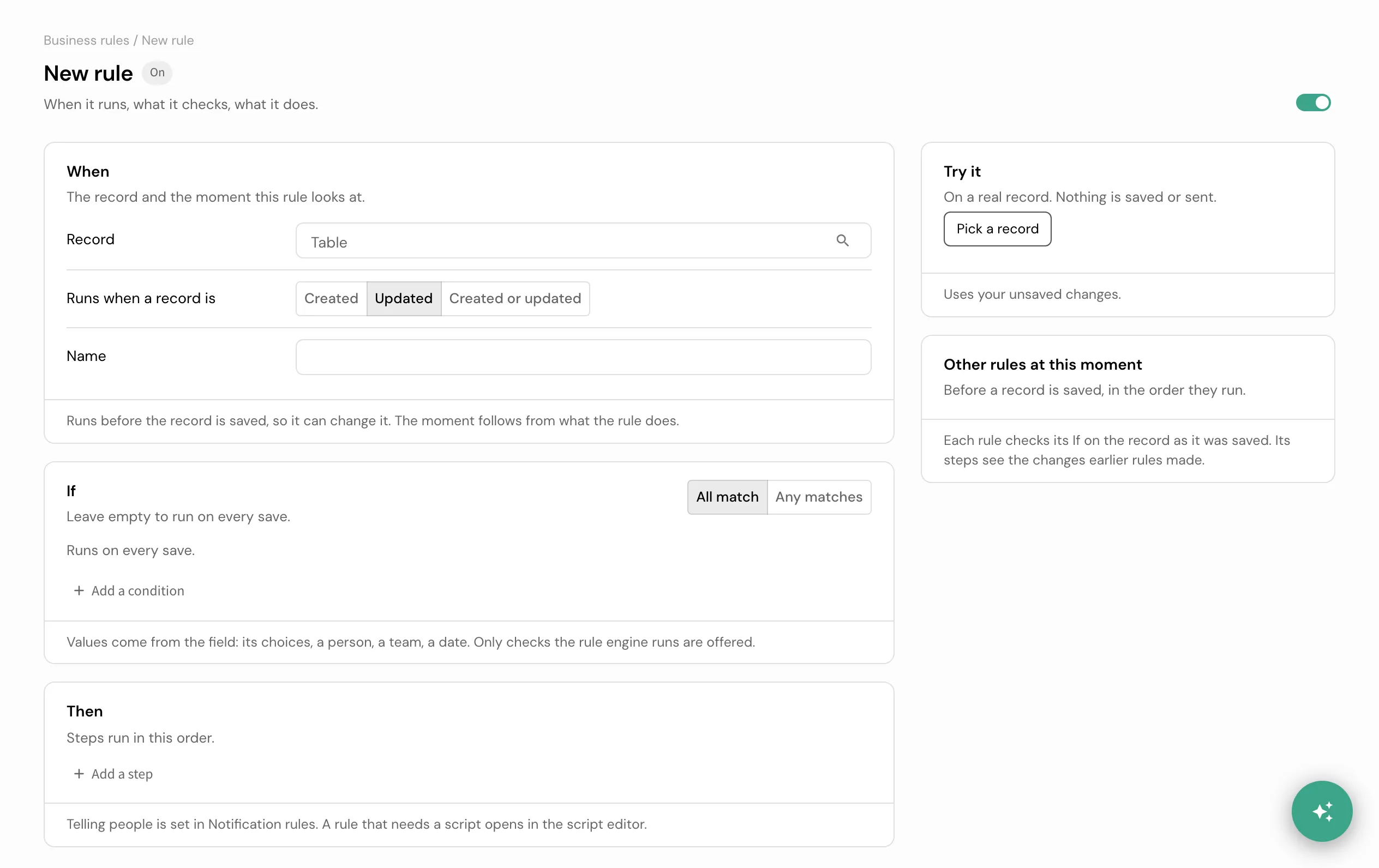
Opening a rule (or choosing New rule) goes to the rule page, read top to bottom:
- When. The record it watches, fixed once the rule is first saved, and whether it runs on Created, Updated, or Created or updated. The moment it runs (before or after the record is saved) is not a setting: it follows from what the rule does.
- If. The field tests, combined with All match or Any matches, that decide whether it runs. Leave it empty to run on every save. Only the fields and checks the rule engine actually runs are offered; values come from the field itself, its choices, a person, a team, or a date.
- Then. The numbered steps the rule takes, in order: set a field, assign, stop the save with a message (all before the save), or request an approval, create tasks, start a workflow (all after the save). A rule holds one moment: a step that belongs to the other moment is refused on the page, and “Move to a new rule” opens it as a new rule in a new tab with the same When and If. Telling people is a separate concern, set in Notification rules; the Then panel only links to it.
- Try it, beside the page, runs the rule’s current conditions and steps against one real record you pick, and shows what matched, what would change, and what would be asked for approval, created, or started. Nothing is saved or sent.
A rule that still needs a script or a formula opens the same page for When and If; Then becomes “Open the script editor”, which opens a narrower page for the script or formula itself, its recent runs, and its version history. A rule that runs a shared script points to the Scripts page instead.
An after-save step that fails is never silent, and it no longer shows up in the save itself. The save already went through: an after-save action (an approval that could not resolve an approver, a workflow that could not start) that fails is written as an internal work note on the record, in English and German, instead of a warning on the save reply. Open the record’s activity to see it.
Build and test rules in the builder guides.
Good to know
- A check the rule engine does not run is named, never hidden. An older rule saved with a check the engine has since dropped shows “Never runs” instead of silently always failing.
- A rule that changes fields can trigger other rules. This cascade is bounded by a depth limit that stops rather than looping forever.
- A child table can switch off an inherited rule for itself, without affecting the parent or its siblings.
- A rule’s If is checked right before its own turn. Rules at the same moment run in the order shown under “Other rules at this moment”, and each rule’s If sees the changes every earlier rule in that order already made, not just the record as it was saved. A rule that is skipped because its If did not match is named, with why, alongside the rules that ran.
- Text checks ignore letter case. “Is” (equals), “Changed to” and “Changed from” treat Resolved and resolved as the same value, in rules built on the page and in older shipped rules alike.
- An older rule that watched a field change reads as “changed”. A shipped rule that ran when any of several fields changed shows those fields as “changed” checks matched with Any, which is exactly when it runs. Where that reading is exactly the same rule, the page can save it.
- Try it runs the whole order, not one rule on its own. It reads the record with your own access and runs every rule at that moment, in the engine’s own order, in a sandbox that is rolled back: the rule you are trying is marked, every other rule shows ran or skipped and why, and nothing is saved or sent. An approval, a task, or a workflow it would start is only named, never actually requested or run.
Business Rule vs Workflow
Both automate, but they fit different shapes of work.
| Business Rule | Workflow | |
|---|---|---|
| Reacts to | one record event on one table | a trigger, then runs on its own |
| Shape | one condition set, one action | many steps, with branching and loops |
| Timing | synchronous, in the moment | asynchronous, multi-step |
| Reach | the record and its inheritance chain | across tables and records |
| Reach for it when | ”when X changes, do one thing" | "run this whole process” |
A rule can start a workflow, so they compose: the rule decides when, the workflow runs the process.
How it connects
A Business Rule decides when things run; it does not own them. Delivery belongs to Notifications, a decision gate to Approvals, and multi-step work to a Workflow. Which rules reach an inherited table follows Tables and records.
- Build and test a rule in the builder guides.
- Exact shapes: the rule table
business_rules(table, trigger, conditions, action); the operator vocabulary and every term in the glossary.