Notifications
A Notification Rule tells the right people when something happens. It fires on an event such as a record create, update, or delete, a state or field change, a comment, an agent run, or a scheduled digest, works out who should hear about it, renders a template, and sends one message per recipient and channel. Outbound email is wrapped in your tenant’s colors and logo, so every message looks like one product. Delivery runs through a queue that retries, so a message is not lost if a send fails the first time.
When you’d use it
- Tell an assignee or a team when a task is raised, reassigned, or changes state.
- Notify a requester when their request is approved, rejected, or resolved.
- Alert on an agent run or a plan that needs review.
- Send a routine summary on a schedule with a daily or weekly digest.
What you manage
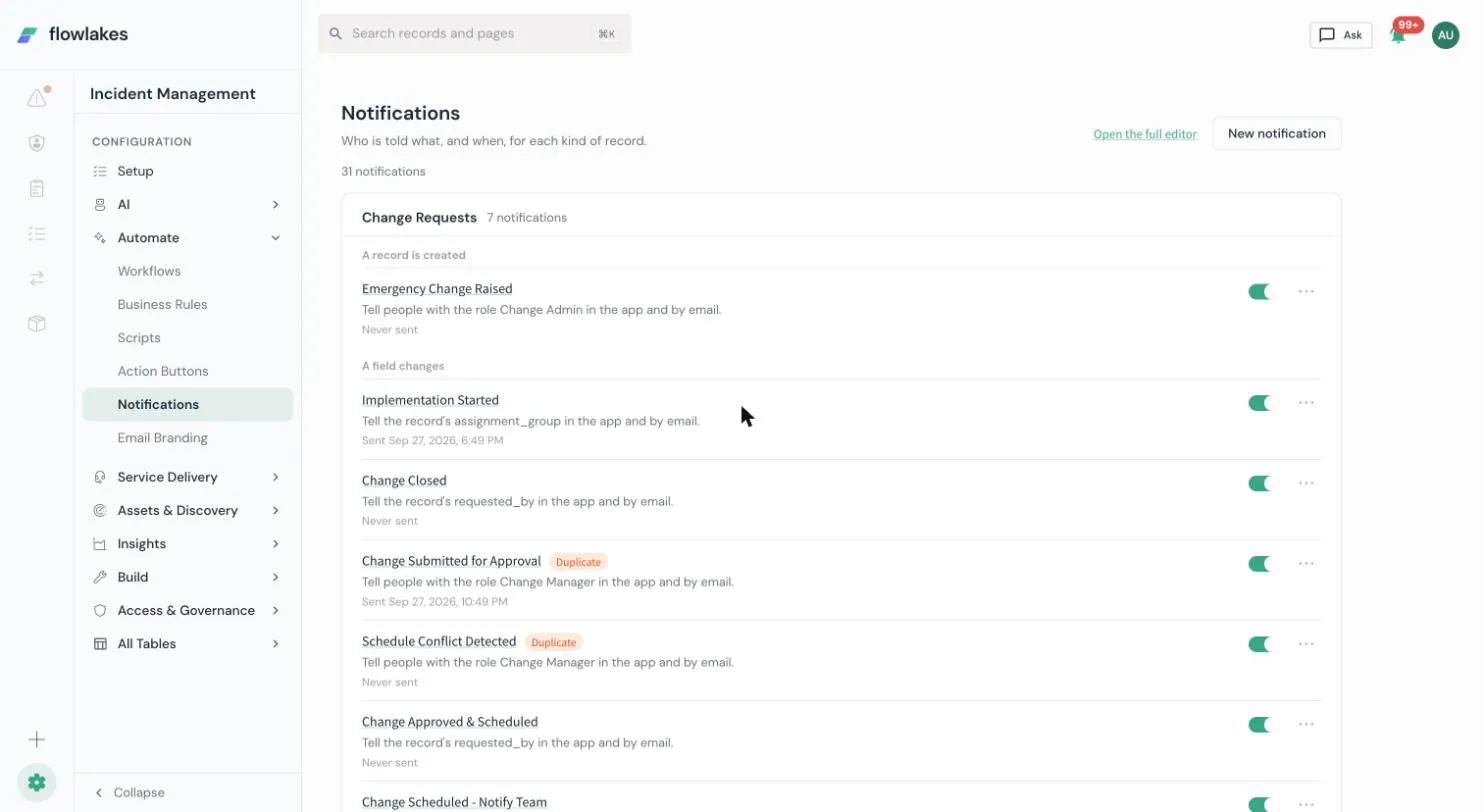
Notifications live under Automate → Notifications (/admin/notifications), and the email look is set in the Email part of Branding (/admin/settings/branding). It opens on the notifications list: every rule the tenant has, grouped by the record it watches and then by the moment that can send it, one sentence per rule (“Tell the Caller in the app and by email”), when it last sent, and whether it is on. Two flags are computed, never stored: “Duplicate”, when another rule on at the same moment tells the same audience, with a tooltip naming it and, on an on rule, a “Turn this one off” action right there that switches it off with the same on/off switch the row already has; and “No recipients”, when the audience resolves to nobody active right now. A person or team on the record is never flagged: who it tells depends on the record, so the list cannot know it; Try it on a record shows it. Rules the platform itself makes, for an agent’s results or a scheduled digest, sit in their own “Made by the platform” group, read only on this page. Switching a rule on or off saves at once.
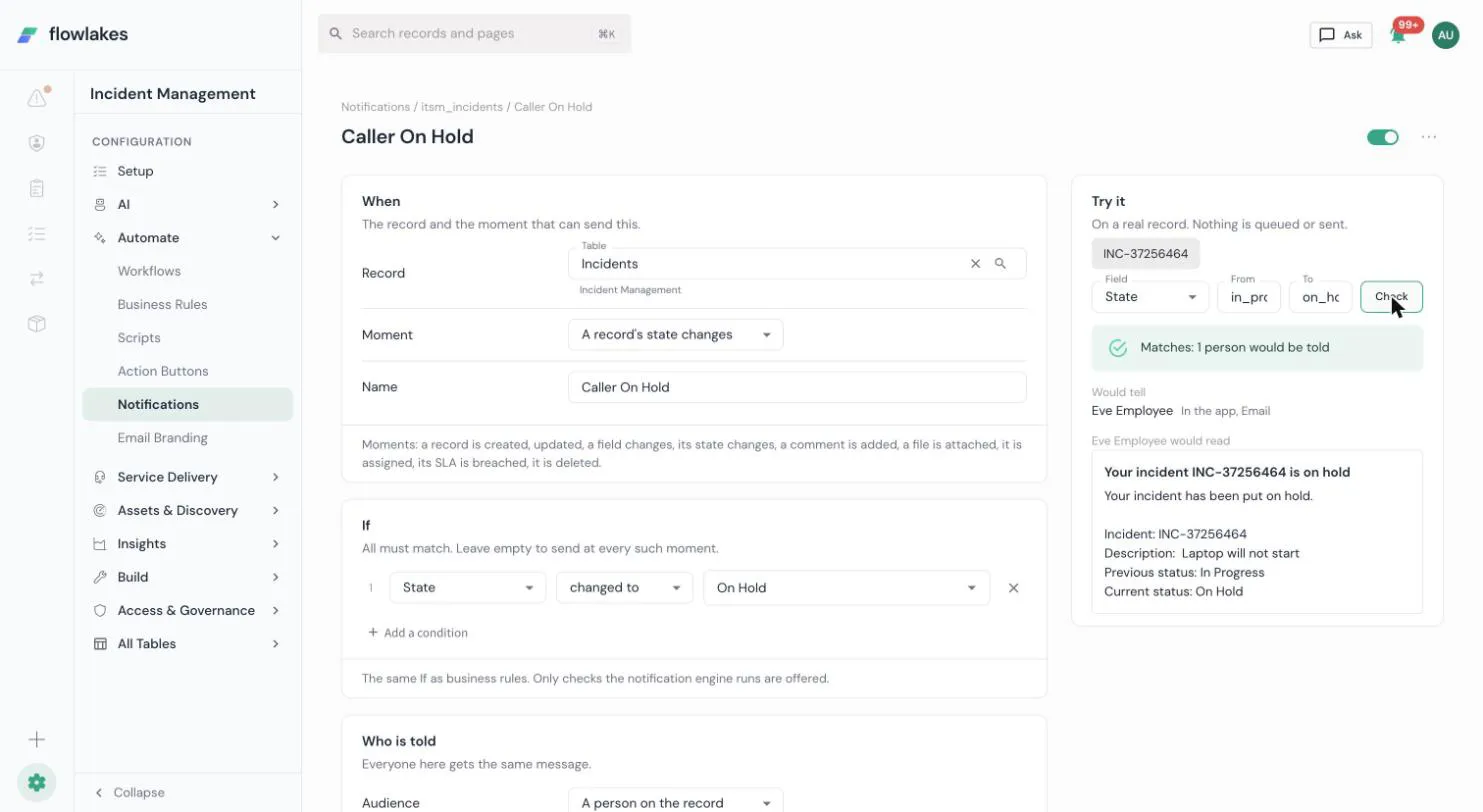
Opening a rule (or choosing New notification) goes to the rule page, read top to bottom. A new rule is not saved until its first Save, and it is saved off; it needs an audience before it can be saved.
- When. The record and the one moment that can send this rule: created, updated, a field changes (naming which fields), its state changes, a comment is added, a file is attached, it is assigned, its SLA is breached, or it is deleted; or, for an agent’s own record, when an agent run finishes, an agent proposes a plan, a plan is approved, a plan is rejected, a plan finishes running, or a person edits a proposed plan’s steps.
- If. The same field tests the business rule page offers, limited to the checks the notification engine actually runs, always matched together (the engine does not offer Any). Leave it empty to send at every such moment.
- Who is told. One audience: a person on the record, a team on the record, people with a role, a team, a person, or an email address. People who are not active are never told, and the person who made the change can be left out. A rule tells one audience; Tell another audience opens a second rule at the same moment, starting from this one’s message, with no audience yet; pick one and save it (off) instead of mixing audiences into one rule.
- How. In the app, by email, or both.
- What is said. The subject (also the title in the app) and the message, with fields inserted by their label rather than typed by hand, and an optional link back to the record. A message shared with another rule is copied for this rule the first time you change it; the other rule keeps the original. Delay, cooldown, an hourly limit, and a digest mode are under Advanced.
- Try it, beside the page, runs the rule’s current, unsaved settings against one real record you pick, and shows whether it matches, who would be told and who would be left out and why, and the message as the first person told would read it. Nothing is saved, queued, or sent.
Archive, on the list or on the rule page, asks first. The rule stops sending; its own message is archived with it, and a message it shared with another rule stays with that rule. A notification shape this page cannot show whole (an older channel, a dynamic recipient, or a rule the platform itself runs) opens read only, naming why, with a link to the full editor. Anything this page does not cover, including the older list-of-recipients shape, stays in that full editor, reached from each rule’s menu.
Create a rule and template, and configure branding, in the admin guides.
Good to know
- A digest cycle with nothing to report stays silent. It does not resend an empty summary.
- Email branding comes from your tenant settings, so you set colors and a logo once and every message uses them. The same company name and logo also show in the portal header and the sign-in page: one Branding page, two parts.
- A custom footer line is added, not swapped in. If you set your own line in Branding, it appears above the standard “Sent by your company, Powered by FlowLakes” credit, which always stays on every message.
- A message about a record carries a button to it, with the record’s number, and a short summary (its number, its short description, and the change, for a status update) when the template allows a record link.
- Delivery is asynchronous and retries. A message is queued, not sent inline, so a slow mail server does not block the event that triggered it.
- Each recipient reads the message in their own language. If a rule notifies a German-speaking assignee and an English-speaking manager on the same event, each gets the subject and body in the language saved on their profile. A recipient with no saved preference sees the tenant’s default language, and any text nobody has translated yet still shows the language it was written in. Dates in a notification show in the standard
2026-09-24form for now. - A link in a message always points at your own tenant. On the shared platform it uses your tenant’s own address; on a dedicated stack it uses that stack’s own declared address. A link inside the app itself never needs that address at all: it is relative to wherever you are already signed in.
- A send blocked by missing configuration is held, not failed. If your tenant’s own address is not known yet, or a connection a message depends on has no working credential, the message is held with the reason, not marked failed and thrown away. Fix the missing setting, then retry the held message from the Outbox: it re-renders from what was saved at the time it was queued and sends as originally written, so nothing is lost while the setting was missing.
- The Outbox (Admin → Notifications → Outbox) lists every email the platform tried to send, whatever happened to it: sent, not sent, failed, or still waiting, each with a short reason and a preview of what was sent. A failed, held, or cancelled row can be retried from there.
- Two rules that both match the same event never double-send the same recipient on the same channel. If a second rule matches the same person on the same channel with the same message, the duplicate send is skipped and recorded, never delivered twice. Two different rules that both notify the same person with different content (for example a new-incident notice and an urgent alert) still both send; this only stops the SAME message going out twice.
How it connects
Notifications own who gets told, the message, its branding, and delivery. Deciding an approval outcome belongs to Approvals, and running business logic belongs to Business rules; Notifications deliver the messages those produce.
- Create a rule and template in the admin guides.
- Exact shapes: tables
fl_notification_rules,fl_notification_templates,fl_notification_queue,fl_notification_preferences; every term in the glossary.