Service Hub
Service Hub is how requests come in and get to the right team. A catalog item is what someone asks for: its questions, the values every request from it gets, who approves it and who does the work. When someone submits it, Service Hub checks the answers, applies the item’s values, runs your business rules, and creates the request record along with a work item on fl_tasks. A Service Offering then decides where the request goes: a published offering stamps the assignment group and the SLA due dates onto the new task. The team that owns the fulfillment picks it up from there.
When you’d use it
- Offer a request type to end users through a catalog form.
- Route each request to the right team with an SLA, without wiring it per form.
- Reuse one offering across several catalog items that share a fulfillment team.
- Gate a request behind an approval before fulfillment starts.
What you manage
Catalog items and offerings live under Service Delivery: the admin catalog at Service Hub Admin (/admin/service-hub), offerings under Service Offerings (/services/offerings), and the end-user portal at /service-hub. What you configure:
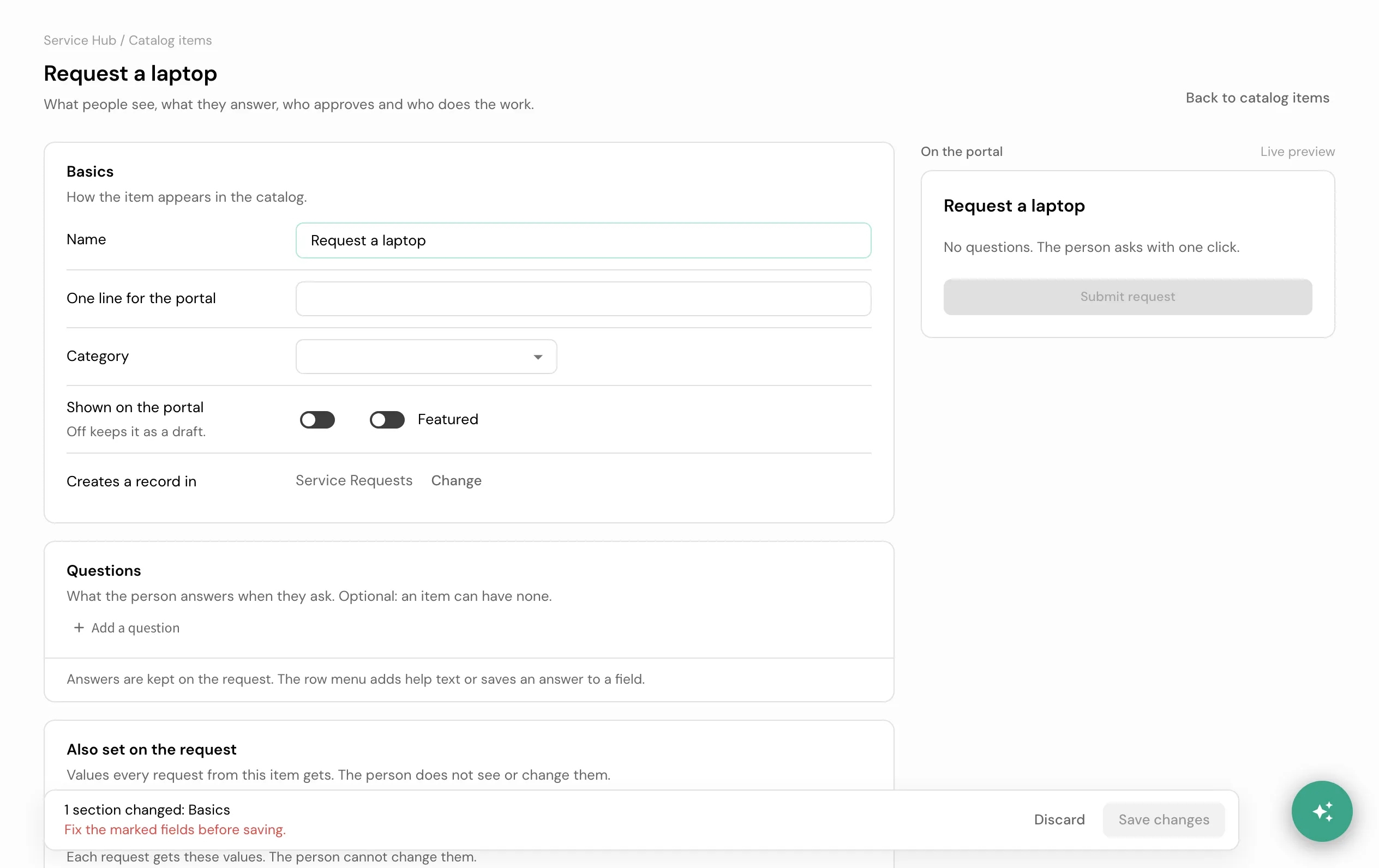
- The catalog item, on one page. Open an item from Catalog items (or Create catalog item). The page has six parts and a live portal preview, and one Save changes writes them together:
- Basics: name, the line shown on the portal, category, shown or a draft, featured. Pick New category… in the category list to make one without leaving the item.
- Questions: what the person answers. Each question has a kind of answer: text, a number, a date, a choice, yes or no, or Pick a record (a person, a service, a device, any record the request’s fields point at). An answer is kept on the request, or saved to one of its fields from the row menu. A choice saved to a field that has its own list uses that list.
- Also set on the request: values every request from this item gets, such as its type or state, or the requester as the person it is for. The person never sees or changes them.
- Who can see it: everyone, or only some roles or groups.
- Approval: none, the requester’s manager (with a team that decides when there is no manager), a team, or a person. It is kept as the item’s policy in Approvals.
- Who handles it: the team the request goes to and the tasks it creates.
- The Service Offering. The owning team and the SLA it commits to, then bind it to the catalog item.
Build a catalog item and offering in the builder guides.
Good to know
- The offering stamps commitments; it does not run the work. Fulfillment is keyed on the stamped assignment group and handled downstream.
- A request takes only the item’s questions. Anything else a submission sends, such as a team or a state, is refused by name, so the item’s own values always hold. A picked record must be one the picker would offer that person.
- Rules and calculations are set in the form editor. On a saved item, Open the form editor under the questions opens the item’s own form and comes back to the item. Once a form has rules or computed fields, the page shows its questions read only and never overwrites them.
- Categories are the portal’s sections. The Categories tab lists them with how many items each holds. From a row you can edit a category, add a subcategory, or hide it from the portal. A category can be deleted only when it holds no items and no subcategories.
- Approvals self-trigger from a policy. The page writes the item’s approval as a policy; a policy changed in Approvals beyond what the page can say shows as Custom.
- A request that needs approval never hangs. If nothing routes an approval, an admin-fallback approval is created so the request still moves.
- What a requester sees while a request waits. A request in Pending Approval shows Waiting for approval on the portal, as the step on its progress bar and as the line under the title. It says the same whether an approver has been asked or the request is held because nobody could be asked yet; the reason is an internal note for the desk. A request on hold keeps its place on the bar with an On Hold badge.
- A refused request says why in plain words. When a rule refuses a request, the portal shows the rule’s own message. Any other refusal shows a short sentence asking the requester to try again or contact the service desk.
- My Requests lists the records. A requester sees every request they raised or that was raised for them, however it was created: from the portal, by an agent on their behalf, or by an admin.
- An explicit routing choice at submit time overrides the catalog item’s bound offering, for the cases where you need it.
The assistant
The portal’s front page can also be a chat: a requester asks a question and the assistant answers from what you have written, or opens the right catalog item prefilled. It answers from three things only: the guides an admin writes for it, the catalog itself, and the house rules. It never invents a VPN name or a policy it was not told.
- The switch, on the Assistant tab of Service Hub Admin (
/admin/service-hub/assistant), turns the chat on or off for the whole tenant. Off, the portal’s front page shows the catalog only: no composer, no assistant copy, and a turn sent anyway is refused by the server. - Guides are what the assistant may say, written on the same tab: a title, a body, and an audience of either requester (used when it answers directly) or desk (used once a conversation reaches the service desk). See Write assistant guides for how to write one well.
- Outcomes, for the last 30 days, are the three ways a conversation ends: answered (the requester said it helped), handed off (it opened a catalog item the requester submitted), and abandoned (the requester left without either). A conversation still going is in progress.
How it connects
Service Hub owns intake, routing, and task creation. Running fulfillment belongs to Business rules and Workflows, deciding approvals belongs to Approvals, and the SLA math belongs to SLA. A catalog item’s name and description, translated for each user, is owned by Languages. What a model provider sees of a requester’s conversation is covered in Privacy and masking.
- Build a catalog item and offering in the builder guides.
- Write a guide the assistant can use in Write assistant guides.
- Exact shapes: tables
service_catalog_items,service_offerings(owning team, SLA), andfl_tasks; every term in the glossary.